
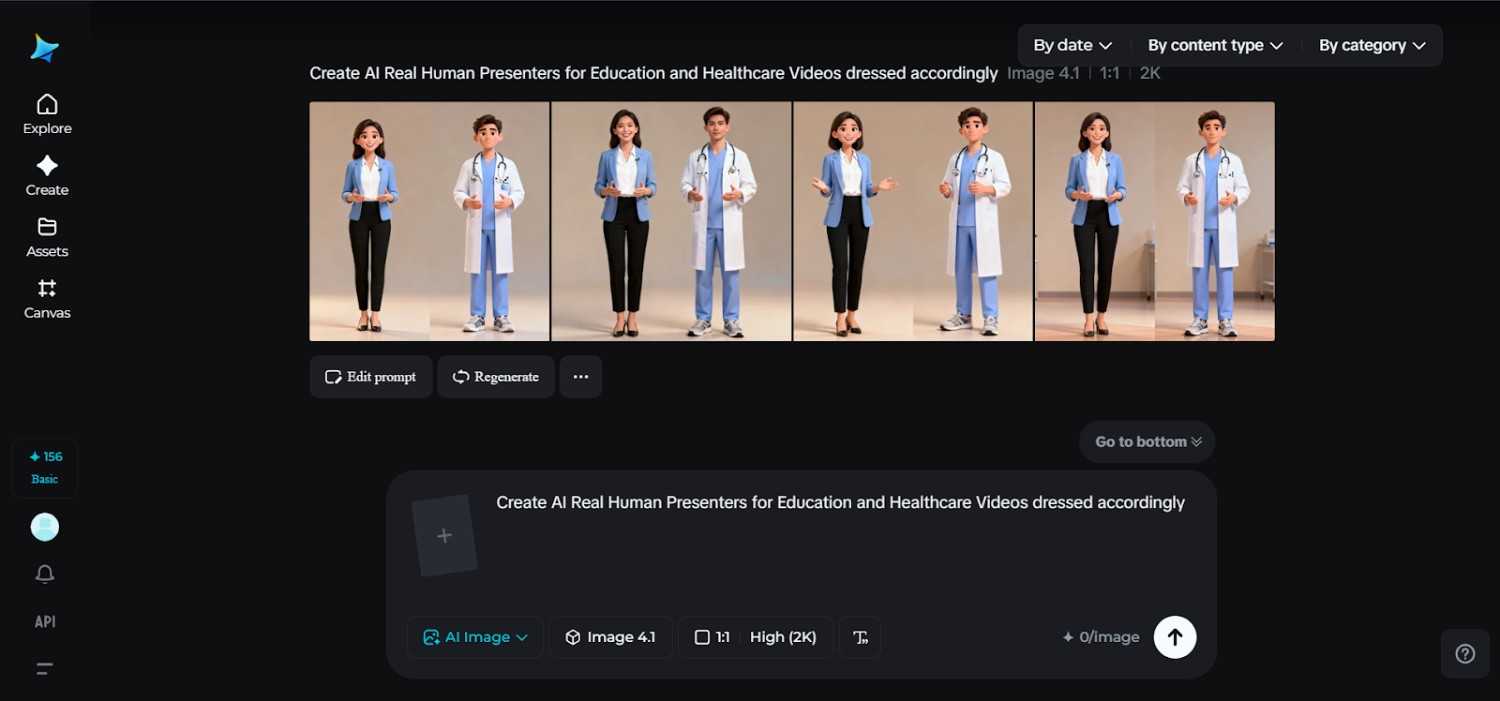
In education and healthcare, clarity outshines spectacle. Learners want instructors who exude calm, credibility, and consistency. Patients want explanations that are easy to follow along with and visually reassuring. That is exactly where the AI human generator becomes a practical storytelling tool and not just some flashy experiment. Dreamina can create images, videos, and avatar videos all in one place easily with text prompts and images.
Instead of studio bookings, lighting setup, or rerecording every update, teams can now turn written scripts into instructor-style videos that feel structured and repeatable. At Dreamina, these presenters are not just some generic avatars but are purpose-built digital instructors developed for classrooms, training portals, patient education, and internal healthcare communication.
This solution does not replace expertise. It simply removes friction from how that expertise is delivered on-screen.
Why are calm and consistent presenters needed in education and healthcare
A lesson in science and a guide on post-treatment care have something in common. Trust, repetition, and visual stability are three things that require similarity.
Human presenters created with the aid of AI ensure that:
- The same teacher eyes across dozens of classes
- Neutral and professional tone: This helps avoid distractions in the video
- Visual continuity when scripts change but remain related in topic
- To manage visual continuity effectively when scripts change but remain related
This means that, as an educator, the individual taking the class recognizes that the subjects covered in the course have a sense of unity. As a healthcare provider, the patient recognizes the subjects presented by healthcare professionals.
Scripts come first, then the visuals: turning the process upside-down
Conventional video production begins with cameras and location scouting. This is flipped for an AI-generated video with a presenting component.
It all starts with the script. With the language defined, the presenter is simply the conduit for the delivery, not the obstacle. This is most beneficial for:
- Healthcare explainers adapting to guidelines
- Videos requiring branding on trainings
Even when reference images have a slightly soft or uneven focus, Dreamina tools make image clearer before they can be refined into a tutorial image.
Where static knowledge turns into educational video explainers
AI presenters are best when used in conjunction with text video production. This enables the production of full-fledged tutorial videos by referencing text, meaning that none of the video needs to be shot.
It is where artificial intelligence video creation proves useful for:
- Lecture explanations
- Patient walk-throughs
- Compliance and Safety Videos
Although the visual presenters remain constant, the scripts carry out the teachings. No looping animations, no jerky movements, but simple narration replicating the way teachers teach.
A lighter touch on occasions without compromising credibility
Not all educational or healthcare videos have to be produced seriously. Some internal or student-facing content may include a softer tone.
Teams may trial a short, simplified tutorial or reminder, via the help of a video meme generator, particularly within the context of an onboarding project. The effect can be positive if used as an occasional means to humanize information without diminishing authority.
The point is that the same AI host presents the more serious and lighter material, and this helps the overall experience remain coherent.
Constructing trust through visual familiarity
Consistency builds trust. When students or patients are exposed to the same instructor repeatedly within different videos, understanding enhances.
AI human presenters will support this by:
- Maintaining facial consistency
- The posture and framing should be predictable.
- Smoothing out visual noise
Such stability is especially important in healthcare education, where anxiety may interfere with understanding.
Dreamina workflow for AI instructors that really teach
Step 1: Compose a text prompt
Come to Dreamina, then, and start with a detailed textual description that clearly outlines your instructor. Consider the profession, tone, and visual environment that apply to education or healthcare.
Sample prompt: Create a professional AI human presenter suitable for healthcare education videos. The presenter appears as a calm and approachable medical instructor in neutral-colored professional attire. The facial expression should be reassuring, posture upright, and lighting soft and clinical. It should exude a feeling of trust and clarity-the best way to describe medical procedures, patient care steps, or training modules.
A clear brief ensures that the host feels credible before a single video is produced.
Step 2: Modify parameters and generate
Select the model that offers realistic facial details and stable expressions. Select the aspect ratio, depending on the placement of the video: horizontal for e-learning platforms or vertical for mobile training. Set the size and choose either 1k or 2k resolution, depending on clarity needs. Click Dreamina’s icon once all the settings are complete to generate your AI human.
Step 3: Tailor your needs and download
Refine the presenter by using Dreamina’s custom tools, including in-painting small details, expanding the frame for layout flexibility, removing distractions, and even retouching lighting or texture to give your visuals a clean and instructional look. When it feels ready for teaching, click the Download icon to save the asset for video creation or visual use.
Turn AI presenters into full educational videos
Once the presenter is finalized, it’s time to create a video. Based on the text or reference images that teams may provide, instructor-style videos are created in which the AI human clearly and calmly delivers scripted content.
The following approach is ideal for:
- Online lectures
- Medical procedure explanations
- Training videos for employees
The focus is back on verbal clarity and visual trust, not on animation effects or movement tricks. The presenter becomes more a digital instructor, rather than a performer.
Why Dreamina fits education and healthcare so well
Dreamina supports careful, intentional creation, rather than hurried visuals. That can matter in domains where accuracy and tone are critical.
By keeping everything inside one ecosystem, educators and healthcare teams avoid fragmented workflows. Scripts, visuals, refinements, and exports stay connected.
Conclusion: teaching without cameras, caring without studios
Education and healthcare don’t need louder videos; they need clearer ones.
With Dreamina, teams can transform beautifully written scripts into instructor-style videos that are reliable, calming, and full of human appeal. Artificially intelligent presenters eliminate barriers in production without the elimination of professionalism.
When learners recognize the instructor, and patients feel visually reassured, information flows better. Dreamina makes that consistency possible, one script at a time.

